Sender Help Center
  • Home
  • Pricing
  • Knowledgebase
  • Log In
  • Get Started
Menu
Sender Help Center
Close menu
Home Pricing Knowledgebase
Log In Get Started
Floating Floating Floating Floating Floating

Knowledge Base

Search
  • Authenticate your domain
  • Automation
  • Drag & Drop Email Editor
  • Getting started with deliverability
  • Getting started with Sender
  • Integrations
  • Manage contacts
  • Payment & Billing
  • SMS campaigns
  • Subscription forms
Knowledge Base
FAQ Contact Us
Home/Knowledge Base/

Creating Import Files for Your Contacts

Last Updated: Sep 30, 2025
Learn how to properly format your contact files for a smooth import into Sender.

Supported File Formats

Sender accepts the following file types:

  • CSV (.csv)
  • TXT (.txt)
  • MS Excel (.xlsx)

Maximum file size: 64MB

File Structure Requirements

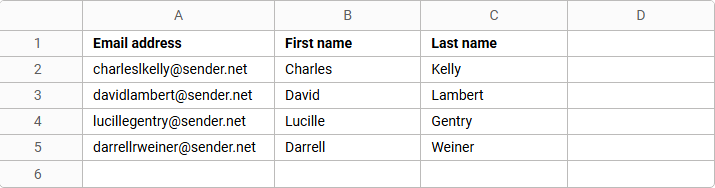
Column Headers (First Row)

Your file must include headers in the first row to identify each field:

  • Email address (required)
  • First name (optional)
  • Last name (optional)
  • Custom fields (optional)

Data Rows

  • Each subscriber must be on a separate row
  • All subscriber information should be in separate columns
  • No empty rows between contacts

File Example

Download Templates

Not sure how to format your file? Download our ready-to-use templates:

  • Excel template – For .xlsx files
  • CSV template – For .csv files

Simply fill in your contact information following the template structure.

Tips for Success

  • Ensure email addresses are valid and properly formatted
  • Remove any duplicate entries before importing (Our system does catch duplicates whether you remove them or not, but this helps the import itself)
  • Double-check that all data is in the correct columns
  • Save your file in one of the supported formats

That’s it!

If you got stuck on a specific task or can’t find a way to execute a particular job, contact our support team via LiveChat or [email protected] – we’re here to help 24/7.

Premium capabilities Feels enterprise,
minus the price

All the features your business needs to acquire high-quality leads, grow sales, and maximize revenue from campaigns
using one simple dashboard.


Get Started For Free
shape 1
shape 2
shape 3
Sender logo
Product
Email marketing platformEmail marketingEmail automationBulk email senderEmail blast serviceNewsletter softwareText messaging serviceMarketing automationEmail templatesPricing
Features
Email campaignsDrag & drop email builderHTML email builderEmail A/B testingAudience segmentationEmail personalizationReports & AnalyticsLanding page builderAll features
Knowledge Base
Getting started with SenderGetting started with deliverabilityDomain authentication guideMarketing automation guideDrag & drop email builder guideIntegration guideSMS campaigns guidePayments & billingContact management guideGetting started with subscription forms
Support & Resources
Email marketing tipsHelp centerMigration serviceReport abuseTraining videosSender APIIntegrations
Company
Contact usAffiliate programTerms of serviceAnti-spam policyPrivacy policy
Get Started For Free
Trusted by 180,000 successful
businesses worldwide
Brand ratings
© 2012-2025 Sender.net
GDPR Compliant
ISO Certified
Secure Data Practices